
Počítačové kabely a konektory

1.5m Cable Plug and Play High Clarity Black HDMI-compatible to DVI Male Converter for Laptop

5Pin to 4Pin Fan Connector Adapter Converter Extension Cable for Dell PC Laptop

Rozšiřující rozbočovač Switch 4portový USB 2.0 rozbočovač Počítačový USB rozšiřující rozbočovač s jedním přetažením, čtyřportový rozbočovač pro PC, notebook, stolní počítač

Rozšiřující rozbočovač přepínače 7portový rozbočovač USB 2.0 Počítač Rozšiřující rozbočovač USB Rozbočovač jedním přetažením Sedmiportový rozbočovač PC Laptop Desktop

1,2m stolní počítačové tlačítko praktické odolné ABS resetovací tlačítko počítače pro kancelář

20cm Big 4-pin 1-to-3 Male to Female IDE Molex Power Extension Cable Adapter Cord for Computer PC

Adaptér Xinweiqing 22pinový na USB 3.0 2,5palcový pevný disk, HDD, SSD, SATA, převodník

1,5 m 9pinový DB9 sériový RS232 na RJ45 Cat5 ethernetový konzolový překlápěcí kabel pro Cisco

Data Transfer Charging Cable Cord for Texas Instruments TI-84 Plus CE TI-Nspire

1,2/1,5m univerzální napájecí adaptér pro nabíječku notebooku s konektorem EU/US

Prodlužovací kabel s dvojitým vysokorychlostním konektorem USB 2.0 na samec, 150/300 cm, pro počítač

Náhradní audio kabelový adaptér z 13pinového konektoru na 8pinový konektor pro základní desku Lenovo

Xinweiqing Mini DisplayPort DP to VGA HDMI-compatible DVI Converter Adapter Cable for Appl-e Book

Náhradní napájecí kabel Mini 4Pin na 2 SATA SDD pro základní desku Lenovo
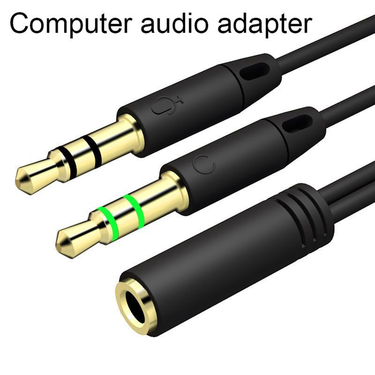
Sluchátkový rozbočovač Sluchátkový adaptér Audio 3,5 mm zásuvka na 2 zásuvkové konektory Aux kabel
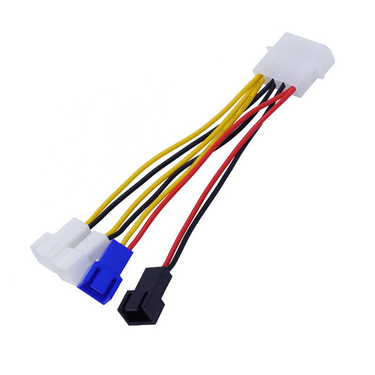
4v1 kabel pro chlazení počítače, napájecí kabel pro ventilátor, adaptér pro chladič CPU a PC

13Pcs/Set Universal Laptop Notebook Silicone Anti Dust Ports Cover Plug Cap

USB kabel široce kompatibilní s vysokorychlostním přenosem, opletený prodlužovací kabel USB 3.0 samec-samice pro notebook

Adaptér/převodník 5V 2cestný USB na 4pinový kabel, kabel pro připojení ventilátoru počítače

Portable 1.8m 1080P HDMI-compatible to VGA Male Adapter Cable Video Converter Cord for PC DVD HDTV
What You Should Know About Computer Cables for Fluency PC Experience
Choosing the right computer cables can be difficult because there are so many types on the market. With a few guidelines, you can make choices to improve your computer performance and keep your workspace organized. Voghion will break it down step by step.
Setting Up Your Gaming or Workstation Network
Selecting the right cable ensures your network won’t slow down at crucial moments. Cat 6 cable and cat 8 ethernet cable handle heavy data traffic effortlessly, keeping your connection smooth even during peak usage. So they are perfect for game players and office ladies. Maybe you will need a full desk mouse pad and an ergonomic mouse for more pleasure.
Older cables like cat 5 cable might manage basic tasks, but they struggle with high-speed transfers. If your budget is not that high, you can buy this type. For smaller setups, a lan cable is enough for basic internet needs.
Connecting Laptops and Monitors Efficiently
Using a usb-c cable lets you charge your laptop and transfer files quickly at the same time. For monitors, a 4k hdmi cable delivers sharp visuals without flickering. The right computer monitor cable ensures text is crisp, videos are smooth, and colors are accurate.
Consider the cable length and quality—shorter, well-made cables keep your desk tidy and prevent signal drops. If you want to enjoy quicker speed of your website, try our dongles and wireless routers.
Choosing the Best USB and HDMI Cables
A usb extension cable can save frustration when ports are hard to reach, especially behind a desk or TV. High-quality HDMI cables support 4K resolution and clear audio, eliminating annoying flickers or interruptions. If you like watching movies on your computer, a high-quality sound card is a must.
Reinforced connectors are worth the investment—they last longer and reduce wear from frequent plugging. Selecting durable cables prevents future hassle and keeps your setup neat.
Maintaining Cable Safety and Longevity
Organizing computer cables with clips or sleeves reduces tangles and prevents wear. Checking your computer power cables for frays protects your equipment from electrical issues. Small habits like labeling cables or routing them along desk edges make everyday use smoother. Caring for them doesn’t just extend their life—it also ensures your devices perform reliably day after day.
 4.4 z 5 na základě recenzí 9,249